- Swagger API 는 API Document 를 자동으로 만들어주어 협업에 도움을 주는 것 뿐만 아니라,
Postman 과 같은 별도의 외부 테스트 툴을 사용하지 않아도 API 문서에서 바로 API 를 테스트 하게 해주고,
코드상으로는 별도의 주석을 남길 필요가 없이 API 관리가 가능하기에 굉장히 유용한 기술입니다.
이번 포스팅에서는 Springboot 에서 Swagger 를 사용할 때에 어떤식으로 활용하는 것이 좋은지에 대한 간략한 팁을 짧게 소개드리겠습니다.
- Swagger Controller 기본 형태
import com.raillylinker.services.RootService
import io.swagger.v3.oas.annotations.Operation
import io.swagger.v3.oas.annotations.media.Content
import io.swagger.v3.oas.annotations.media.Schema
import io.swagger.v3.oas.annotations.responses.ApiResponse
import io.swagger.v3.oas.annotations.tags.Tag
import org.springframework.http.MediaType
import org.springframework.stereotype.Controller
import org.springframework.web.bind.annotation.GetMapping
import org.springframework.web.servlet.ModelAndView

@Tag(name = "root APIs", description = "Root 경로에 대한 API 컨트롤러")
@Controller
class RootController(
    private val service: RootService
) {
    // <멤버 변수 공간>


    // ---------------------------------------------------------------------------------------------
    // <매핑 함수 공간>
    @Operation(
        summary = "루트 경로",
        description = "루트 경로 정보를 반환합니다.",
        requestBody = io.swagger.v3.oas.annotations.parameters.RequestBody(
            content = []
        ),
        responses = [
            ApiResponse(
                responseCode = "200",
                description = "정상 동작",
                content = [
                    Content(
                        mediaType = MediaType.TEXT_HTML_VALUE,
                        schema = Schema(
                            implementation = ModelAndView::class
                        )
                    )
                ]
            )
        ]
    )
    @GetMapping(path = ["", "/"])
    fun getRootInfo(): ModelAndView? {
        return service.getRootInfo()
    }
}
저의 경우는 코틀린을 사용하므로 그에 맞춰 설명드리는데, 자바로 변형하는 것도 어렵지는 않을 것입니다.
위 코드는 전형적인 컨트롤러 코드입니다.
저의 경우는 RestController 가 아니라 일반적인 Controller 를 사용하여 MVC 웹 랜더링이 가능하게 했고, 필요하다면,
@ResponseBody
어노테이션을 붙여서 Rest API 를 작성하도록 하였습니다.
이는 확장성을 위한 선택입니다.
@Tag 는 Swagger 의 컨트롤러 단위별 설명을 적어두는 설정 어노테이션으로,
위와 같이 적었다면,

위와 같이 표시가 됩니다.
그 아래에 API 항목들을 적게 됩니다.
위에서는 getRootInfo 라는 API 함수 하나가 존재하는데, 그 위로 설정 어노테이션을 딱 2개만 설정하면 됩니다.
@GetMapping 은 Springboot 에서 함수에 매칭되는 메소드와 주소를 적는 설정으로,
Get 메소드 매핑에, "" 나 "/" 경로로 접근시 getRootInfo API 와 연결한다는 의미가 됩니다.
@Operation 어노테이션은 Swagger 의 해당 API 항목에 대한 설명을 적는 곳입니다.
summary 는 제목,
description 은 설명,
requestBody, responses 는 각각 요청과 응답에 대한 설명을 적는 것입니다.
API 로서 필수인 정보들을 위와 같이 설정함으로써 3가지 장점이 생기게 됩니다.
1. 내 코드에 대한 주석 기능
2. 타인에게 공개하기 위한 API 설명 문서 작성 기능
3. Swagger 문서의 테스트 기능 활성화를 통한 테스트의 용이함


위 결과를 보았을 때,
설정한 내용이 잘 반영되었는 것을 확인할 수 있습니다.
API 문서 및 테스트 기능은 제쳐두고서라도,
누구든 자신이 만든 코드에 대한 주석은 해두어야 하므로 보일러 플레이트 코드 몇줄이 늘어나는 것을 제외하고는 일반 주석을 입력하는 개념으로 생각했을 때, Swagger 설정을 이용하지 않을 이유는 없다고 생각합니다.
그나마 있는 보일러 플레이트 코드의 단점도,
API 에 대한 주석의 표기 형식 통일이라는 장점과 상쇄될 수 있죠.
예를 들어 본인이 작성한 주석이라 할지라도 주석 형식이 달라질 수 있고, 필요한 정보를 실수로 입력하지 않을 경우도 있지만,
위와 같이 코드로 강제한다면 이 API 가 무엇이고, 어떤 기능을 수행하며, 입력값이 어떤 것이고, 출력값의 status code 와 그 body 가 어떤식으로 출력되는지를 명확하게 기록할 수 있죠.
최근에는 Springboot 뿐만 아니라 FastAPI 와 같은 현대적인 백엔드 프레임워크에는 기본적으로 Swagger 가 제공되기 때문에, 그만큼 검증되고 편리한 기능이라 추천드립니다.
- 사실 제가 추천드릴 것도 없이 많은 분들이 이미 유용하게 사용중이실 테지만,
제가 겪은 바, 의외로 이를 활용하지 않고 간단한 동작 테스트에도 별도의 테스트 툴을 준비하거나, API 문서를 수동으로 작성하거나, 혹은 아예 작성하지 않는 분들도 있기 때문에 이렇게 팁과 함께 설명을 드리는 것입니다.
마지막으로,
Springboot 에서 Swagger 를 사용할 때, Multipart File 을 받는 API 를 선언하는 방식을 정리하겠습니다.
- Post Multipart Form-Data 코드
    @Operation(
        summary = "Post 요청 테스트 (multipart/form-data)",
        description = "multipart/form-data 형태의 Request Body 를 받는 Post 메소드 요청 테스트<br>" +
                "MultipartFile 파라미터가 null 이 아니라면 저장",
        requestBody = io.swagger.v3.oas.annotations.parameters.RequestBody(
            content = [
                Content(
                    mediaType = MediaType.MULTIPART_FORM_DATA_VALUE,
                    schema = Schema(
                        implementation = PostRequestTestWithMultipartFormTypeRequestBodyInputVo::class
                    )
                )
            ]
        ),
        responses = [
            ApiResponse(
                responseCode = "200",
                description = "정상 동작",
                content = [
                    Content(
                        mediaType = MediaType.APPLICATION_JSON_VALUE,
                        schema = Schema(
                            implementation = PostRequestTestWithMultipartFormTypeRequestBodyOutputVo::class
                        )
                    )
                ]
            )
        ]
    )
    @PostMapping(path = ["/post-request-multipart-form-data"])
    @ResponseBody
    fun postRequestTestWithMultipartFormTypeRequestBody(
        @ModelAttribute
        inputVo: PostRequestTestWithMultipartFormTypeRequestBodyInputVo
    ): ResponseEntity<PostRequestTestWithMultipartFormTypeRequestBodyOutputVo> {
        return service.postRequestTestWithMultipartFormTypeRequestBody(inputVo)
    }

    data class PostRequestTestWithMultipartFormTypeRequestBodyInputVo(
        @field:Schema(description = "String Form 파라미터", required = true, example = "testString")
        @field:JsonProperty("requestFormString")
        val requestFormString: String,
        @field:Schema(description = "String Nullable Form 파라미터", required = false, example = "testString")
        @field:JsonProperty("requestFormStringNullable")
        val requestFormStringNullable: String?,
        @field:Schema(description = "Int Form 파라미터", required = true, example = "1")
        @field:JsonProperty("requestFormInt")
        val requestFormInt: Int,
        @field:Schema(description = "Int Nullable Form 파라미터", required = false, example = "1")
        @field:JsonProperty("requestFormIntNullable")
        val requestFormIntNullable: Int?,
        @field:Schema(description = "Double Form 파라미터", required = true, example = "1.1")
        @field:JsonProperty("requestFormDouble")
        val requestFormDouble: Double,
        @field:Schema(description = "Double Nullable Form 파라미터", required = false, example = "1.1")
        @field:JsonProperty("requestFormDoubleNullable")
        val requestFormDoubleNullable: Double?,
        @field:Schema(description = "Boolean Form 파라미터", required = true, example = "true")
        @field:JsonProperty("requestFormBoolean")
        val requestFormBoolean: Boolean,
        @field:Schema(description = "Boolean Nullable Form 파라미터", required = false, example = "true")
        @field:JsonProperty("requestFormBooleanNullable")
        val requestFormBooleanNullable: Boolean?,
        @field:Schema(
            description = "StringList Form 파라미터",
            required = true,
            example = "[\"testString1\", \"testString2\"]"
        )
        @field:JsonProperty("requestFormStringList")
        val requestFormStringList: List<String>,
        @field:Schema(
            description = "StringList Nullable Form 파라미터",
            required = false,
            example = "[\"testString1\", \"testString2\"]"
        )
        @field:JsonProperty("requestFormStringListNullable")
        val requestFormStringListNullable: List<String>?,
        @field:Schema(description = "멀티 파트 파일", required = true)
        @field:JsonProperty("multipartFile")
        val multipartFile: MultipartFile,
        @field:Schema(description = "멀티 파트 파일 Nullable", required = false)
        @field:JsonProperty("multipartFileNullable")
        val multipartFileNullable: MultipartFile?
    )

    data class PostRequestTestWithMultipartFormTypeRequestBodyOutputVo(
        @field:Schema(
            description = "API 결과 코드<br>" +
                    "0 : 정상 동작",
            required = true,
            example = "0"
        )
        @field:JsonProperty("code")
        val code: Int,
        @field:Schema(description = "API 응답 본문 (code 가 0 이 아니면 null)", required = false)
        @field:JsonProperty("value")
        val value: Value?
    ) {
        @Schema(description = "값 스키마")
        data class Value(
            @field:Schema(description = "입력한 String Form 파라미터", required = true, example = "testString")
            @field:JsonProperty("requestFormString")
            val requestFormString: String,
            @field:Schema(description = "입력한 String Nullable Form 파라미터", required = false, example = "testString")
            @field:JsonProperty("requestFormStringNullable")
            val requestFormStringNullable: String?,
            @field:Schema(description = "입력한 Int Form 파라미터", required = true, example = "1")
            @field:JsonProperty("requestFormInt")
            val requestFormInt: Int,
            @field:Schema(description = "입력한 Int Nullable Form 파라미터", required = false, example = "1")
            @field:JsonProperty("requestFormIntNullable")
            val requestFormIntNullable: Int?,
            @field:Schema(description = "입력한 Double Form 파라미터", required = true, example = "1.1")
            @field:JsonProperty("requestFormDouble")
            val requestFormDouble: Double,
            @field:Schema(description = "입력한 Double Nullable Form 파라미터", required = false, example = "1.1")
            @field:JsonProperty("requestFormDoubleNullable")
            val requestFormDoubleNullable: Double?,
            @field:Schema(description = "입력한 Boolean Form 파라미터", required = true, example = "true")
            @field:JsonProperty("requestFormBoolean")
            val requestFormBoolean: Boolean,
            @field:Schema(description = "입력한 Boolean Nullable Form 파라미터", required = false, example = "true")
            @field:JsonProperty("requestFormBooleanNullable")
            val requestFormBooleanNullable: Boolean?,
            @field:Schema(
                description = "입력한 StringList Form 파라미터",
                required = true,
                example = "[\"testString1\", \"testString2\"]"
            )
            @field:JsonProperty("requestFormStringList")
            val requestFormStringList: List<String>,
            @field:Schema(
                description = "입력한 StringList Nullable Form 파라미터",
                required = false,
                example = "[\"testString1\", \"testString2\"]"
            )
            @field:JsonProperty("requestFormStringListNullable")
            val requestFormStringListNullable: List<String>?
        )
    }
POST 메소드의 Multipart Form-Data API 는 위와 같이 선언합니다.
Operation requestBody 의 content 로 multipart-form-data 를 설정하여 그에 맞는 DTO 클래스를 입력하면 됩니다.
함수 파라미터의 DTO 는 @ModelAttribute 를 붙이면 되고,
DTO 내의 각 파라미터들은 Schema 로 Swagger API 에 표시할 설명, 필수 여부, 예시값을 설정하고,
JsonProperty 로 Json 파싱할 때의 변수명을 설정(이 값이 a 고 변수명이 b 면, 외부에서 a 로 입력하여 요청시 변수 b 가 받습니다.)하면 됩니다.
MultipartFile 역시 예외는 없어서, 다른 변수들처럼 그대로 작성하면 되며,
이렇게 설정했다면,
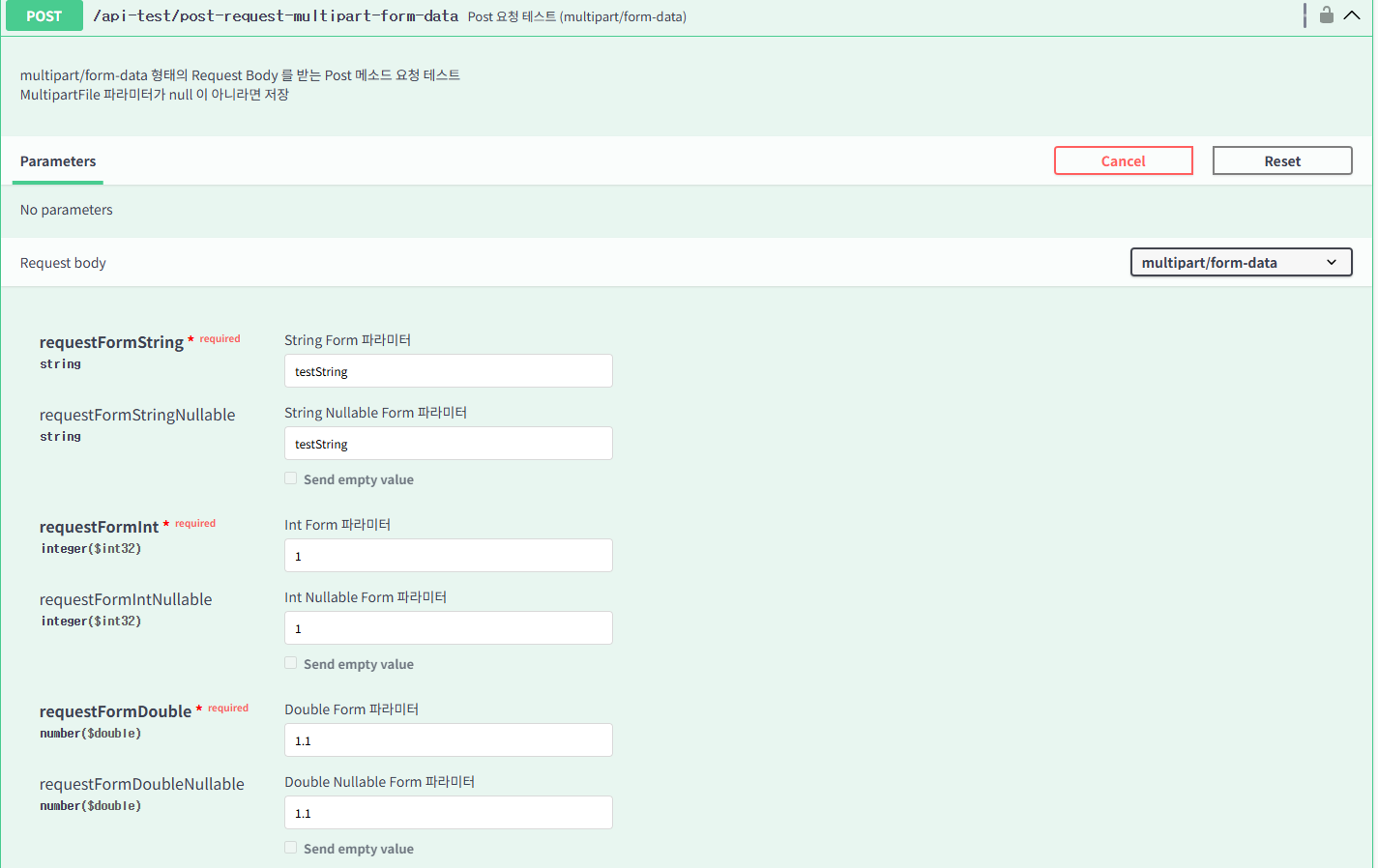

위와 같이 Swagger 문서 상으로도 테스트시 파일 입력창이 생기게 되며,
입력값, 출력값의 설명이 모두 잘 표시됩니다.
이상입니다.
'Programming > BackEnd' 카테고리의 다른 글
| 서비스 리소스 업로드 처리 전략(리소스 보안, AWS S3 CloudFront / PresignedURL, Local 업로드 인터페이스) (0) | 2026.02.12 |
|---|---|
| [Springboot] Redis 캐싱 간편 적용법 (0) | 2025.12.20 |
| MSA 실전 적용, 인증/인가 서비스 구조 및 운용 방식 설명 (0) | 2025.10.23 |
| [실용 아키텍쳐] 접속량 폭증 방지, 접속대기 처리 패턴(큐-티켓 방식, 한정 자원 N 개 요청 동시 처리 제한) (0) | 2025.10.17 |
| Springboot JPA Entity 변수 매핑 정리 (Java, Kotlin) (0) | 2025.05.08 |